Skip to content

Free and open source · for macOS

Get better at chess, with Leela as your coach.

Play human-like Maia opponents and Leela Chess Zero at exactly your level, then let Grandie review every game, drill your openings and serve puzzles at your rating. The engine runs on your Mac's GPU, so everything stays on your computer.

v0.1.0 · Universal (Apple Silicon and Intel) · macOS 13+

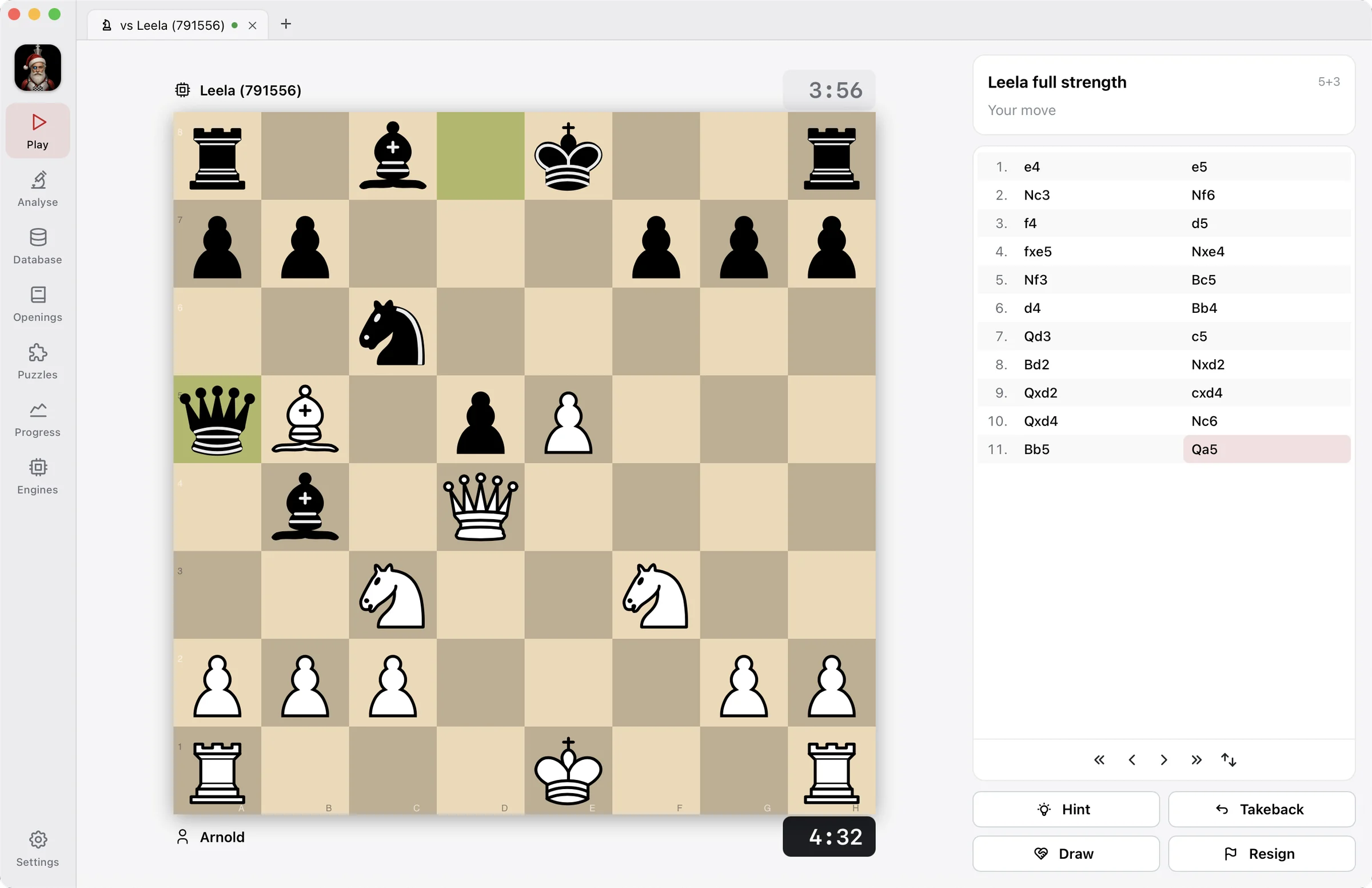
Grandie Chess during a game against Leela at full strength: the board, both clocks, the move list and the Hint, Takeback, Draw and Resign buttons

Features

One app for playing, studying and improving

Grandie brings together what usually takes several sites and tools, built around Leela Chess Zero, one of the strongest chess engines in the world.

  • Play at your level

    Human-like Maia opponents from 1100 to 2200, eight calibrated Leela levels from about 750 to 2650, or Leela at full strength. Clocks, hints and takebacks included.

  • Review every game

    Accuracy for both sides, every inaccuracy, mistake and blunder, the move that was better, and a button to retry the position until you find it.

  • Analyse deeply

    Leela and any UCI engine side by side, with Stockfish one click away. Multiple lines, an evaluation bar and graph, and variations you can edit.

  • Your game database

    Import your games from Lichess, Chess.com and PGN files. Filter by opening, rating or result, and search by exact position or piece pattern.

  • Train your openings

    An opening explorer over your games, Lichess and Masters, and a repertoire you drill with spaced repetition, so lines come back just before you'd forget them.

  • Puzzles at your rating

    Tactics from the Lichess puzzle database, filtered by theme and served near your level, with your own Glicko-2 puzzle rating.

  • Track your progress

    Your strength against each opponent level over time, accuracy and blunders per game, your weakest openings and your puzzle rating.

  • Runs on your Mac

    Leela Chess Zero is built in and runs on your Mac's GPU through Metal. No account, no subscription, and your games stay on your computer.

Screenshots

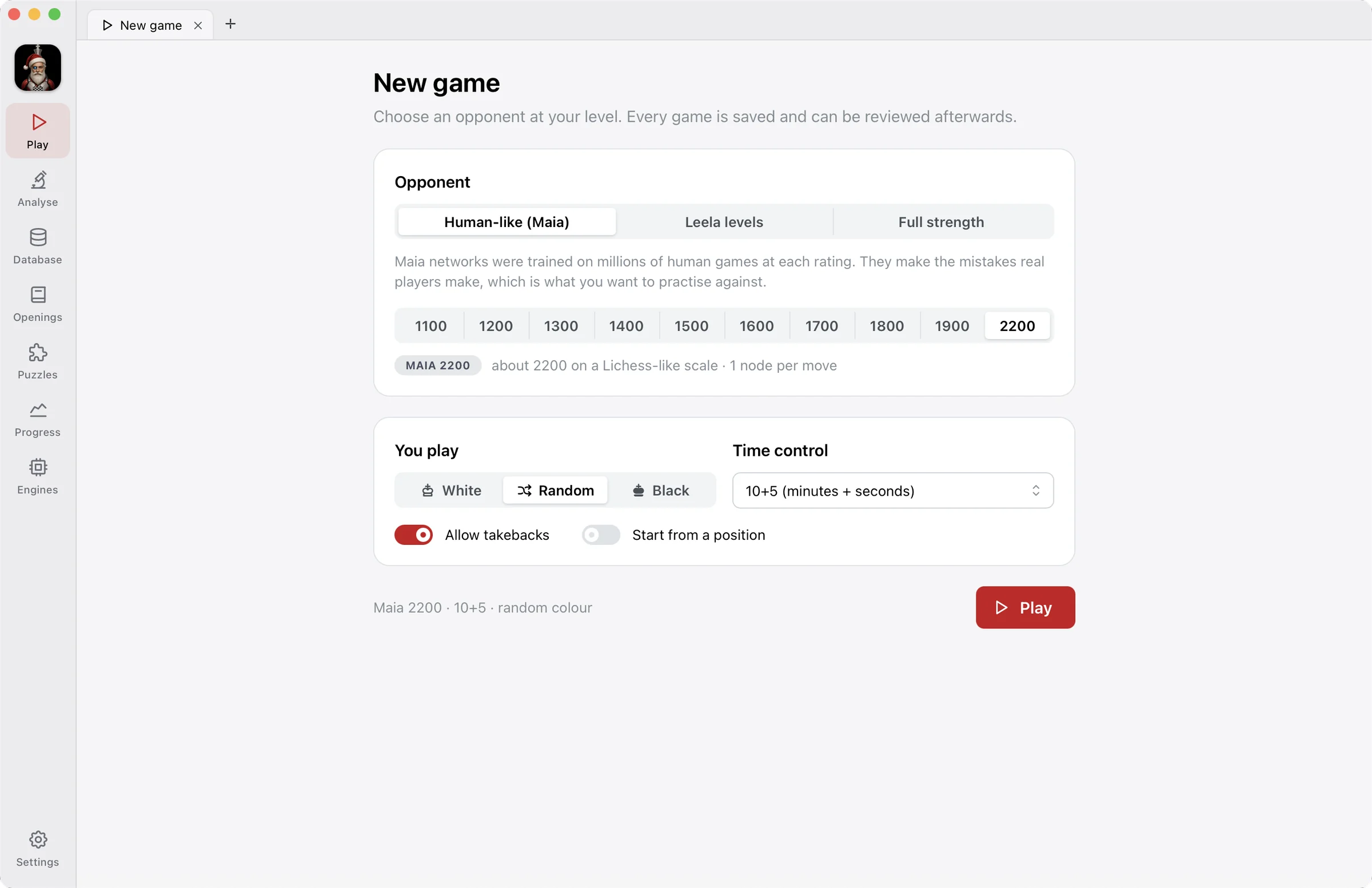
New game

An opponent that plays like you

Maia networks learned from millions of human games at each rating, so they make the mistakes real players make. Pick one at your level, or a Leela level calibrated against Stockfish.

  • Maia 1100 to 2200, eight Leela levels, or full strength
  • Your colour, any time control, or start from a position
  • Takebacks when you want to explore
The New game screen: Human-like (Maia), Leela levels and Full strength opponents, Maia ratings from 1100 to 2200, colour choice and time control

Play

Every game becomes a lesson

Play with real clocks, ask for a hint when you're stuck, and offer a draw when it's level. When the game ends, Grandie reviews it and shows you where it turned.

  • Accuracy, mistakes and blunders for both sides
  • The better move at each turning point
  • Retry the position until you find it
A game against Leela at full strength, with clocks, the move list and the Hint, Takeback, Draw and Resign buttons

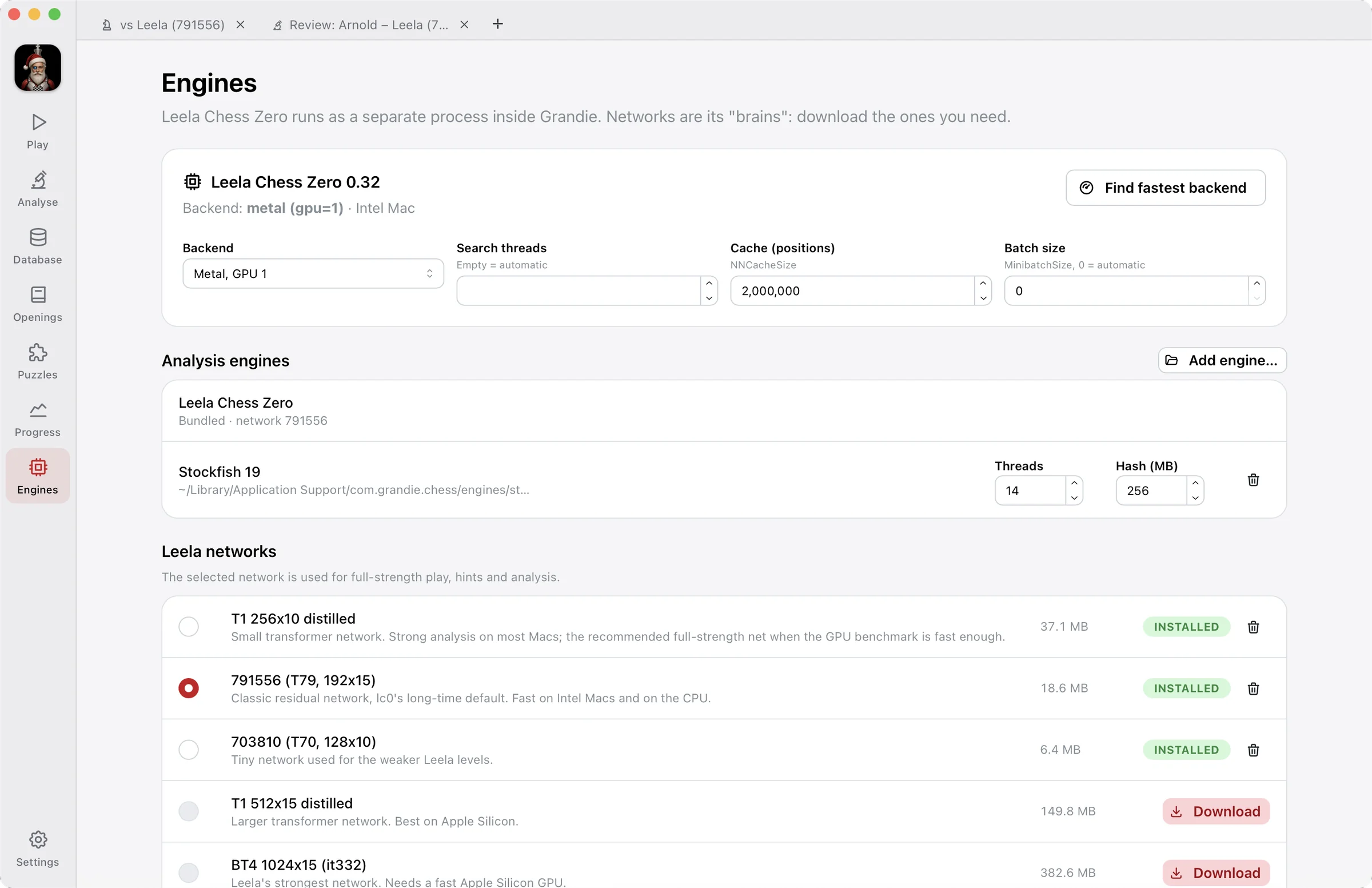
Engines

Leela on your Mac's GPU

Grandie bundles Leela Chess Zero and finds the fastest way to run it on your Mac. Choose the network you want, and add Stockfish or any UCI engine for a second opinion.

  • Metal on the GPU, or the CPU, picked by a benchmark
  • Networks from tiny to Leela's strongest
  • Stockfish in one click, or any UCI engine
The Engines screen: Leela Chess Zero 0.32 on the Metal backend, Stockfish 19 as an analysis engine, and the list of Leela networks to install

Install

Up and running in a couple of minutes

On first launch, Grandie downloads the neural networks it plays with (about 30 MB) and times your Mac to pick the fastest way to run Leela.

  1. 1

    Download

    Get the universal disk image. It runs natively on Apple Silicon and Intel Macs.

  2. 2

    Drag to Applications

    Open the .dmg and drag Grandie Chess into your Applications folder.

  3. 3

    Open it once

    This build isn't notarised by Apple yet, so the first time macOS says it can't verify the app. Click Done.

  4. 4

    Allow it

    Go to System Settings → Privacy & Security, scroll down and click Open Anyway. You only do this once.

Download for macOS

v0.1.0 · Universal (Apple Silicon and Intel) · macOS 13+

Older versions and release notes are on GitHub Releases.

FAQ

Questions

Is Grandie Chess free?

Yes. It's free and open source under the GPL-3.0 licence, with no account, subscription or ads. The source code is on GitHub.

Who makes Grandie Chess?

Grandie Chess is designed and built by Ikondesoft Limited. It's open source, so anyone can read the code, report problems and suggest improvements on GitHub.

Why does macOS warn me when I first open it?

Releases aren't signed with an Apple Developer ID or notarised yet, so macOS can't verify who made the app. Approve it once in System Settings → Privacy & Security → Open Anyway, and it opens normally from then on.

Which Macs does it run on?

Any Mac with macOS 13 Ventura or later. The download is universal: it runs natively on Apple Silicon (M1 and later) and on Intel Macs. Leela runs on the GPU through Metal, and falls back to the CPU where that's faster.

Does it need an internet connection?

Only for downloads you start: the neural networks (once), the Lichess puzzle database, importing your games from Lichess or Chess.com, and the online Lichess opening explorer, which needs a free Lichess API token. Playing, reviews, analysis and your database all work offline.

What is Maia?

Maia is a family of neural networks from researchers at the University of Toronto, Cornell and Microsoft Research, trained to predict the moves real players make at a given rating rather than the best move. Playing Maia at your level feels like playing a person, mistakes included.

Where are my games stored?

In a database on your Mac, in your user Library's Application Support folder. Your games are never uploaded anywhere. Apart from the downloads and imports you start, the app only goes online to check GitHub for updates.